Fish和Zsh比较一下的话,Fish可以说是开箱即用,不用你去做什么多余的配置,比较简单,傻瓜式~
我个人建议不要在生产环境上装这类工具,自己的机器用用是可以的。
Debian10安装fish这里添加官方的源装最新版:
apt -y update
apt -y install wget curl git
echo 'deb http://download.opensuse.org/repositories/shells:/fish/Debian_10/ /' | tee /etc/apt/sources.list.d/shells:fish.list
wget -nv https://download.opensuse.org/repositories/shells:fish/Debian_10/Release.key -O '/etc/apt/trusted.gpg.d/shells:fish.asc'
apt -y update
apt -y install fish
然后切换到fish:
chsh -s /usr/bin/fish注:关闭你的终端再次登录才能生效!
重新登录上来后安装Oh My Fish:
curl -L https://get.oh-my.fish | fish注:安装完成之后关闭你的终端重新登录一遍。
接下来就可以用Oh My Fish来安装主题了,这里我推荐几个还不错的主题:
spacefish
shellder
agnoster
bobthefish
godfather
emoji-powerline
fisk
gentoo
numist
我现在用的spacefish配合Windows Terminal还不错:
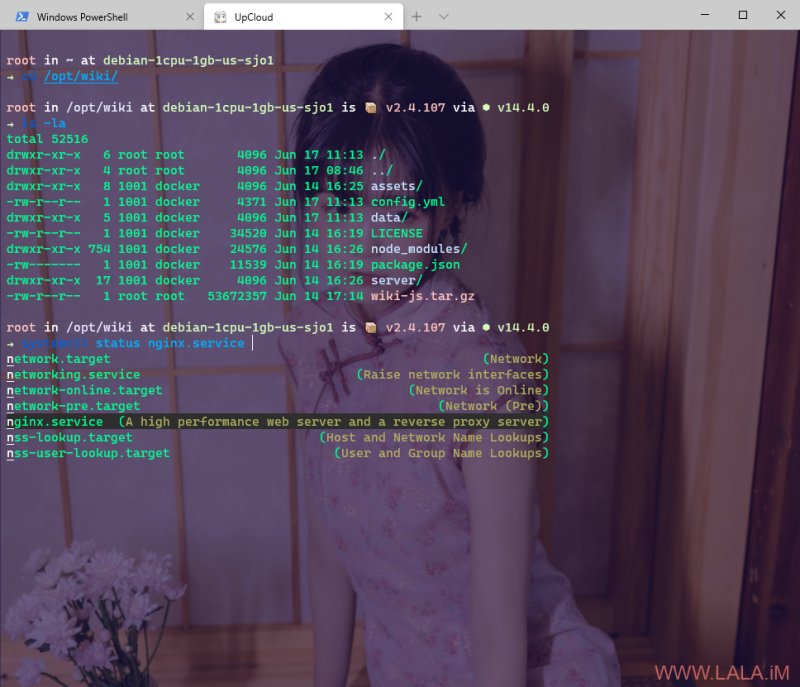
如果你要查看所有可用主题:
omf theme安装一个主题:
omf install spacefish安装多个主题后切换主题:
omf theme numist建议选用我上面推荐的主题,其他主题有时候安装了会出现问题,可使用下面的命令提示修复:
omf doctor删除一个主题:
omf remove numist更新Oh My Fish:
omf update卸载Oh My Fish:
omf destroy如果觉得Fish不好用,想换回默认的Bash:
chsh -s /bin/bash注:关闭你的终端再次登录才能生效!
卸载Fish,一定要先chsh换回默认的bash并且重新登录到默认的bash后再执行下面的操作!否则你的机器就挂B了:
apt remove --purge fish
apt autoremove