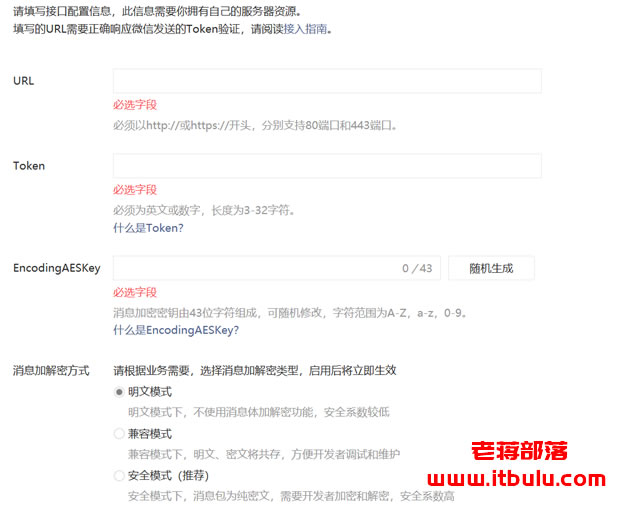
我们可以看到在"开发"-"基本设置",有上图几项需要设置的。URL地址是需要应对授权接口的,我们需要在本地服务器中提交页面对接。
> <?php
> /**
> * wechat php test
> * 验证结束后,关闭valid验证接口,开启responseMsg消息回复接口
> */
> //define your token
> define("TOKEN", "itbulucom");
> $wechatObj = new wechatCallbackapiTest();
> $wechatObj->valid();
> class wechatCallbackapiTest
> {
> public function valid()
> {
> $echoStr = $_GET["echostr"];
> //valid signature , option
> if($this->checkSignature()){
> echo $echoStr;
> exit;
> }
> }
> public function responseMsg()
> {
> //get post data, May be due to the different environments
> $postStr = $GLOBALS["HTTP_RAW_POST_DATA"];
> //extract post data
> if (!empty($postStr)){
> /* libxml_disable_entity_loader is to prevent XML eXternal Entity Injection,
> the best way is to check the validity of xml by yourself */
> libxml_disable_entity_loader(true);
> $postObj = simplexml_load_string($postStr, 'SimpleXMLElement', LIBXML_NOCDATA);
> $fromUsername = $postObj->FromUserName;
> $toUsername = $postObj->ToUserName;
> $keyword = trim($postObj->Content);
> $time = time();
> $textTpl = "<xml>
> <ToUserName><![CDATA[%s]]></ToUserName>
> <FromUserName><![CDATA[%s]]></FromUserName>
> <CreateTime>%s</CreateTime>
> <MsgType><![CDATA[%s]]></MsgType>
> <Content><![CDATA[%s]]></Content>
> <FuncFlag>0</FuncFlag>
> </xml>";
> if(!empty( $keyword ))
> {
> $msgType = "text";
> $contentStr = "Welcome to wechat world!";
> $resultStr = sprintf($textTpl, $fromUsername, $toUsername, $time, $msgType, $contentStr);
> echo $resultStr;
> }else{
> echo "Input something...";
> }
> }else {
> echo "";
> exit;
> }
> }
> private function checkSignature()
> {
> // you must define TOKEN by yourself
> if (!defined("TOKEN")) {
> throw new Exception('TOKEN is not defined!');
> }
> $signature = $_GET["signature"];
> $timestamp = $_GET["timestamp"];
> $nonce = $_GET["nonce"];
> $token = TOKEN;
> $tmpArr = array($token, $timestamp, $nonce);
> // use SORT_STRING rule
> sort($tmpArr, SORT_STRING);
> $tmpStr = implode( $tmpArr );
> $tmpStr = sha1( $tmpStr );
> if( $tmpStr == $signature ){
> return true;
> }else{
> return false;
> }
> }
> }
红色部分是需要我们自己自定义的Token,同时与公众号设置界面的Token保持一致。EncodingAESKey随机生成即可。然后进行连接配对。
PS:如果提示还不行,我们需要在" 公众号开发信息"中授权IP白名单,因为我有设置,不清楚这个白名单对于这个是否起到效果。
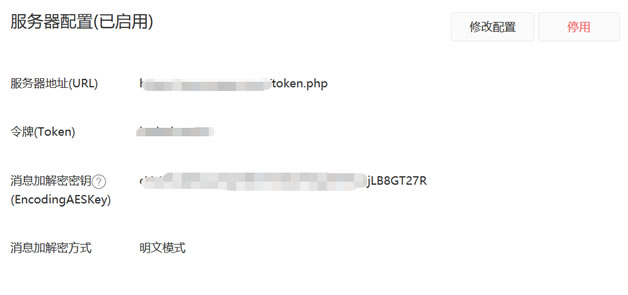
然后我们启动即可,看到上图所示,这样就表示连接畅通。