第一、查看所有端口情况
> netstat -ntlp
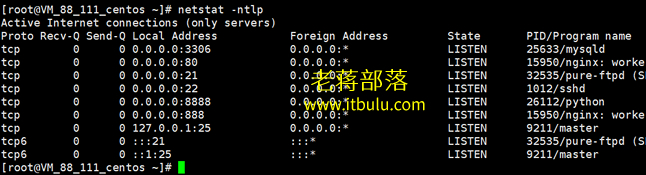
这里我们可以看到当前的端口占用。有些时候我们软件环境端口无缘无故丢失也可以查看那端口在服务器中是否有设置。
第二、查看80端口占用情况
> lsof -i tcp:80
我们WEB用途肯定会用到80端口的,如果WEB不通畅可以检查80端口是否在运行。

第三、开启80端口方式
> # Open 80 Port Edit By :itbulu.com
> /sbin/iptables -I INPUT -p tcp --dport 80 -j ACCEPT
> /etc/init.d/iptables save
> service iptables restart
如果我们需要开启80端口直接这里开启,或者需要添加规则,还是这个方便。
第四、关闭80端口方式
> # Close 80 Port Edit By :itbulu.com
> /sbin/iptables -I INPUT -p tcp --dport 80 -j DROP
> /etc/init.d/iptables save
> service iptables restart
如果我们需要临时处理WEB服务器,我们可以先关闭80端口。
第五、查看端口被占用
> netstat -lnp|grep 8088
我们可以查看对应的端口被什么占用,将端口8088换成自己需要检测的。
第六、查看进程和禁止进程
> ps 12333
> kill -9 12333
> service httpd start
这里我们可以查看进程详情的编号,以及禁止掉进程,然后重启生效,适合Apache。